AI video demos have one major advantage: they usually end at exactly the right moment.
A five-second close-up of a singer under neon lights can look incredible. An eight-second tracking shot through a rainy street can make it seem as if AI has already solved music video production.
Then you try to make the whole song.
Not five seconds.
Not thirty seconds.
A full three-minute music video.
That is where the real problems begin.
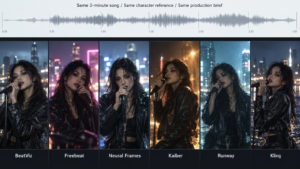
For this comparison, I looked at six different approaches: BeatViz, Freebeat, Neural Frames, Kaiber, Runway and Kling.
I was less interested in which platform could create the prettiest individual shot. I wanted to know which workflow still made sense after dozens of shots, multiple locations, recurring characters and visible singing.
The five things that mattered most were character consistency, visual continuity, lip sync, scene-level corrections and whether the platform could realistically manage an entire song rather than a collection of disconnected clips.
A Full Song Changes the Test
Take a 180-second track.
Runway Gen-4.5 currently generates individual video clips of up to 10 seconds. Even if every shot used the maximum duration, covering a complete song would require at least 18 clips before accounting for failed generations, transitions, faster editing or performance cutaways.
Kling has pushed further, with newer models supporting longer clips, multi-shot generation and improved reference consistency.
But the same underlying distinction remains:
Generating a shot and managing a music video are not the same thing.
After the first few scenes, workflow starts to matter almost as much as raw model quality.
Top Pick: BeatViz — Best for Full-Length AI Music Videos
My top pick for this particular test is BeatViz.
That does not mean BeatViz will create the best-looking individual shot in every situation.
Runway or Kling can absolutely produce a more impressive result for a specific cinematic moment.
What makes BeatViz different is that it treats the entire music video as the project.
Its AI music video workflow moves through music analysis, visual direction, story and scene planning, shot design, start frames, video generation and final assembly.
That extra structure becomes much more valuable when a project stretches beyond a handful of clips.
One feature I found especially useful is the start-frame checkpoint.
Before generating the moving video, you can inspect the performer, clothing, environment, composition and camera angle.
If the character is already wrong at that stage, there is little reason to spend more generation credits hoping the video model will somehow fix it.
Correct the frame first.
Then generate the shot.
That feels closer to actual filmmaking than repeatedly pressing Generate until something usable appears.
The Most Important Test: Can You Fix One Bad Shot?
This became one of the biggest differences once the project grew.
AI video generation is not perfectly reliable. In a three-minute music video with dozens of scenes, some clips will inevitably need another attempt.
The question is what happens next.
If scene 17 has the wrong character, BeatViz lets you return to that segment and regenerate the start frame.
If the frame looks right but the movement does not, you can regenerate the video instead.
If it is a performance shot, lip sync can be handled separately.
The scenes that already work do not need to be rebuilt.
This may not sound as exciting as a new text-to-video model, but for a real three-minute production it becomes much more important.
The quality of a long-form AI workflow is not only determined by how often the first generation succeeds.
It is also determined by how painful the failures are to repair.
Character Consistency Gets Hard After Shot 20
Keeping the same face recognizable across two clips is one thing.
Keeping the same performer consistent across wide shots, close-ups, different lighting conditions, multiple locations and changing camera angles is much harder.
Runway References can help preserve characters and environments, while Kling has also made major improvements in element references, multi-character consistency and multi-shot generation.
These are powerful tools.
But there is still a difference between helping you generate a consistent shot and helping you manage a character throughout an entire music video.
Music-focused platforms try to solve the second problem.
Neural Frames includes character-locking tools across a full-song workflow. Freebeat also uses recurring character definitions during its automated planning process.
BeatViz places character references directly inside the music video workflow so the same identity can continue through scene planning and generation instead of being managed separately for every shot.
Across twenty or thirty scenes, that becomes a meaningful difference.
Lip Sync Works Better When You Do Not Use It Everywhere
One lesson became increasingly obvious during the test:
More lip sync does not automatically mean a better music video.
Real music videos rarely keep the singer facing the camera for three continuous minutes.
Editors move between performance close-ups, wide shots, rear angles, environmental scenes, narrative footage and instrumental cutaways.
Runway’s Act-Two can transfer facial performance and body movement from a driving performance, making it useful when very controlled performance shots are needed.
Kling also offers lip-sync capabilities as part of its broader video ecosystem.
BeatViz takes a more music-video-oriented approach by allowing lip sync to be used on the individual scenes where visible singing actually matters.
That makes more sense to me.
Use accurate lip sync for the chorus close-up.
Then cut to a wide stage shot, a profile, a narrative moment or an instrumental insert.
The final result feels more like an edited music video and less like an AI character singing directly into the camera for three minutes.

Kaiber Shows the Difference Between Style and Narrative
Kaiber is an interesting exception.
Its Music Video Montage workflow analyzes a track and builds visuals around musical characteristics such as mood, energy and tempo.
For highly stylized, abstract or electronic music visuals, that approach can work extremely well.
But Kaiber itself describes the workflow as a montage rather than a narrative film.
That distinction matters.
If the goal is psychedelic imagery, animation or a visually unified audio-reactive piece, strict continuity may not be important.
But imagine a story in which the same performer leaves an apartment, walks through the rain, enters a car, arrives at a venue and finally performs on stage.
Now the problem is no longer visual style.
It is continuity.
And continuity becomes one of the hardest parts of long-form AI video.
Neural Frames and Freebeat Are the Closest Competitors
For complete songs, the most relevant alternatives to BeatViz are not necessarily Runway and Kling.
Neural Frames and Freebeat are closer competitors because they also begin with the music rather than an isolated video prompt.
Neural Frames supports full-song generation, audio-reactive workflows and recurring characters, making it particularly interesting for experimental and music-driven visuals.
Freebeat takes a more automated route, analyzing a track before planning scenes, characters and lip-sync moments across a longer video.
Both go well beyond the traditional text-to-video workflow.
What I preferred about BeatViz, however, was the balance between automation and control.
For a faster full-song workflow, I can use the main Workflow.
For a more conversational process, the AI director can help develop scenes step by step.
And when a few important clips need more hands-on correction, the BeatViz Editor provides a timeline and scene-level controls.
That combination makes it feel less like a single AI generator and more like a small music video production environment.
Three Minutes Changed My Choice
If I only needed one eight-second cinematic clip, I would not automatically choose a dedicated music video platform.
I would choose based on the shot.
Sometimes Runway.
Sometimes Kling.
For highly stylized audio-reactive visuals, possibly Kaiber.
But a complete three-minute song changes the decision.
By the twentieth shot, I am no longer asking only:
Can this model generate a beautiful image?
I am asking:
Where is my character?
Which part of the song does this scene belong to?
What happened in the previous shot?
Which segment has already been corrected?
Which shots need lip sync?
Can I regenerate only this scene?
And how do all of these pieces return to the same song at the end?
That is why BeatViz became my Top Pick for Full-Length AI Music Videos in this test.
It may not outperform the most advanced general-purpose video model on every isolated shot.
But a music video is not one isolated shot.
It is a sequence of shots that all have to belong to the same film.
And that may be the most useful way to judge AI music video tools now:
not by how impressive the first shot looks, but by whether the twenty-fifth shot still feels like part of the same movie.
For a deeper look at this type of full-song workflow, see BeatViz’s guide to turning music into a complete AI video.